Summer Seamless Background Bundle
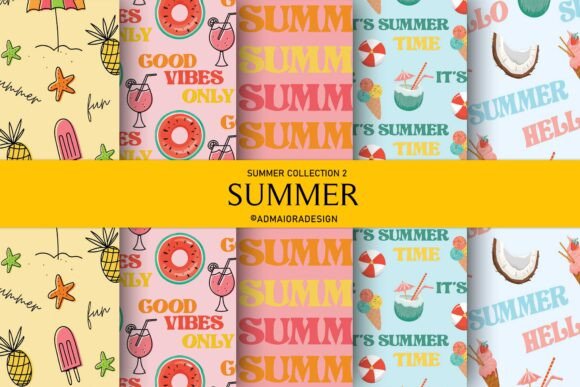
When you're designing for summer—whether it's sublimation apparel, digital planners, social media graphics, or printed craft kits—the right background isn’t just decorative. It’s functional infrastructure. The Summer Seamless Background Bundle delivers exactly that: a curated set of high-resolution, production-ready digital papers built for real-world use—not just aesthetics.
Each background is sized at 4000×3000 pixels and optimized at 300 DPI, meaning they scale cleanly across print and digital outputs without pixelation or quality loss. More importantly, every pattern is truly seamless—no visible repeats, no awkward edges. That means when you tile it across a large-format tumbler wrap, a full-page newsletter header, or a multi-panel greeting card layout, the transition stays invisible and professional.
How It Fits Into Your Creative Workflow
This bundle isn’t meant to sit unused in a downloads folder. It’s designed to slot into active projects—before, during, and after key stages.
Before starting a project: Use the PNG or JPG files as base layers in your design mockups. Because they’re high-res and color-balanced, they let you preview how typography, icons, or product photos will interact with summer-themed textures—without committing to final assets yet. This saves time on revisions later.
During execution: The SVG version becomes especially valuable here. Unlike raster formats, SVGs retain vector integrity at any scale. Resize them to fit a 12×12-inch sublimation blank, stretch them across a 24×36-inch wall art canvas, or shrink them down for a 2×3-inch sticker sheet—all without re-rendering or quality drop. That flexibility eliminates format-switching friction mid-project.
After delivery: Keep the original files organized by naming convention (e.g., “summer-palm-4000x3000-png”) and store them in a dedicated cloud folder labeled “Seamless Textures – Summer.” That way, when next June rolls around—or when a client asks for a seasonal refresh—you can locate, repurpose, or re-license assets in under 30 seconds.
Practical Integration Across Tools and Platforms
The bundle works where you already work. In Canva, upload the PNG or JPG as a background image and lock it to prevent accidental movement. In Adobe Illustrator or Affinity Designer, place the SVG directly—it imports as editable vectors, so you can adjust stroke weights, recolor elements, or isolate individual illustrations if needed.
For sublimation users: The 300 DPI resolution meets industry standards for heat-transfer clarity. When prepping for Cricut Design Space or Silhouette Studio, use the SVG to create cut lines around illustrated motifs (like flamingos or sunbursts), then layer them over the seamless background for layered vinyl projects.
Educators and small business owners often use these backgrounds in printable resources—lesson plans, workshop handouts, or branded worksheets. Because each file includes consistent spacing and balanced negative space, text remains legible even when overlaid without heavy contrast adjustments.
Quality Control and Consistency Considerations
Not all “seamless” patterns are equal. Some rely on subtle blur or opacity tricks that break down at larger sizes or under sharp lighting—especially problematic for sublimation where ink spread can exaggerate seams. These backgrounds were tested across multiple output methods: printed on polyester fabric, rendered on matte paper, and viewed on OLED screens. Each passed for uniform repeat behavior and color fidelity.
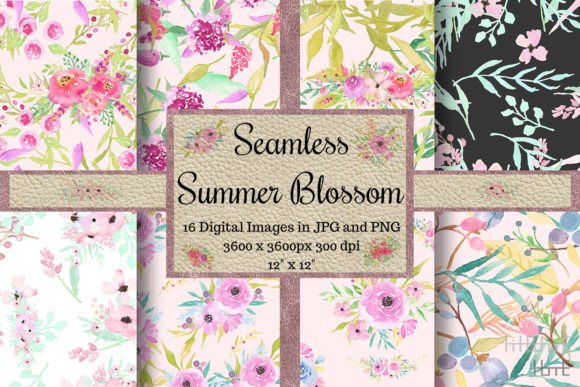
The illustrations themselves—think watermelons, tropical leaves, sun rays, and retro sunglasses—are drawn with clean outlines and intentional spacing. That makes them compatible with clipping masks, gradient overlays, and duotone effects. You won’t need to spend time erasing stray pixels or fixing misaligned tiles.
If you’re building a brand identity system, use one background as your primary summer texture, then pull complementary colors from its palette for fonts, buttons, or accent shapes. Because all 10+ designs share cohesive styling and saturation levels, mixing them across touchpoints (email headers, Instagram Stories, packaging) maintains visual harmony—even if you rotate which pattern appears where.
Efficiency Tips for Long-Term Use
- Batch-prep your assets: Create a master folder with subfolders labeled “SVG,” “PNG,” and “JPG.” Drag each file type into its respective folder. Then duplicate the entire structure and rename it “Summer 2025 Backup” before editing anything—preserving originals.
- Tag smartly: If your operating system supports metadata tagging (macOS Finder or Windows File Explorer), add keywords like “sublimation,” “seamless,” “summer-craft,” and “300dpi” to each file. That speeds up future searches without relying solely on filenames.
- Test before scaling: Before resizing an SVG for a new project, open it in a vector editor and zoom to 400%. Check for stray anchor points or inconsistent line weights. Clean those up once—and apply the fix across all related files—to avoid repeating the same cleanup task later.
- Use transparency intentionally: The PNG files include transparent backgrounds. That lets you layer them over photos, gradients, or solid-color blocks without white borders. For example, overlay a faint palm-frond pattern at 15% opacity over a beach photo to add texture without obscuring detail.
Real-World Use Cases by Role
Freelancers: Include one background as part of your “brand refresh package” for clients launching summer promotions. It adds perceived value without increasing your workload—just swap the file into their existing templates.
Educators: Print the backgrounds on cardstock and cut them into reusable stationery sheets for student journals. Laminate them for durability—since the resolution holds up even when enlarged via photocopier, they stay crisp through repeated classroom use.
Small business owners: Use the SVGs to build custom packaging mockups in minutes. Place a seamless watercolor background behind your product photo in Photoshop, then export a flat JPEG for your Etsy listing or Shopify banner. No need to hire a designer for seasonal updates.
Hobbyists: Pair the PNG files with free tools like Photopea or GIMP. Add a subtle noise filter or grain overlay to mimic vintage postcard texture—then print on matte photo paper for handmade greeting cards that feel tactile and intentional.
What Makes This Bundle Different From Generic Downloads
It’s not about quantity—it’s about coherence and readiness. Many free summer packs offer mismatched resolutions, inconsistent color profiles, or raster-only files that distort when scaled. This bundle avoids those pitfalls by standardizing resolution, format options, and stylistic tone across every asset.
You don’t need to convert files, adjust DPI manually, or patch together fragments from five different sources. Everything works out of the box—because it was built with cross-platform compatibility and production timelines in mind.
If something doesn’t behave as expected—whether it’s an SVG not importing correctly into your cutting software or a PNG appearing slightly off-color on screen—reach out directly. Support isn’t automated. It’s responsive, specific, and focused on getting your project back on track—not explaining why the issue occurred.
That kind of reliability matters most when deadlines loom, inventory needs updating, or you’re preparing materials for a pop-up market this weekend. The Summer Seamless Background Bundle removes guesswork—not just from design, but from planning, execution, and follow-through.