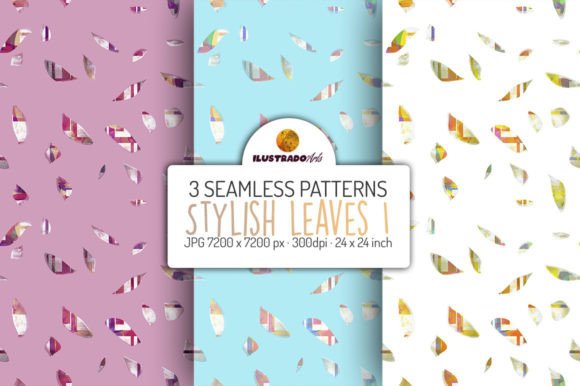
Stylish Leaves SET: Elegant Digital Paper Patterns
When you're designing invitations for a wedding, crafting a boutique book cover, or developing a cohesive brand look for your small business, background patterns matter—deeply. A single well-chosen pattern can anchor your design, convey tone before a word is read, and elevate perceived professionalism without adding complexity. The Stylish Leaves SET delivers exactly that: three thoughtfully composed, high-resolution digital paper patterns built around organic leaf motifs—refined, balanced, and versatile enough to support serious creative work.
Why These Leaves Stand Out Among Digital Papers
Not all leaf patterns are created equal. Many rely on repetition that feels mechanical or botanical illustrations that skew overly literal or decorative. The Stylish Leaves SET avoids both pitfalls. Each of the three designs balances negative space with intentional foliage placement—some emphasize subtle layering and soft shadows; others use clean linework and rhythmic spacing. This isn’t clipart repurposed as texture. It’s purpose-built digital paper: scalable, print-ready, and calibrated for real-world application.
The 24 × 24 inch (7200 × 7200 px) size at 300 dpi means you’re not just getting a background—you’re getting flexibility. Whether you’re printing an oversized greeting card on premium matte stock or tiling the pattern across a full T-shirt front, there’s no pixelation, no awkward scaling compromises, and no need to stitch together tiles manually. That resolution also supports precise cropping: isolate a single leaf cluster for a logo watermark, or zoom into a corner detail for a custom foil stamp on wedding stationery.
Real Projects, Real Time Savings
Creatives often underestimate how much time gets lost adjusting low-res assets—resizing, re-coloring, troubleshooting bleed areas, or re-exporting for different outputs. With the Stylish Leaves SET, one file works across multiple formats and platforms. Designers preparing both digital albums and printed photo books can use the same JPG without conversion headaches. Educators building classroom resources can drop a leaf pattern behind lesson slides and later export the same layout as a PDF handout—no visual mismatch.
For freelancers managing tight client timelines, this consistency cuts revision rounds. A client approves a mockup using Pattern #2 for a baby shower invitation suite; that same file scales cleanly to match the envelope liner, thank-you card back, and digital RSVP page. No redesigns. No “but it looked different on screen” surprises—just reliable execution.
Who Benefits Most—and How
Small business owners launching seasonal product lines find the Stylish Leaves SET especially useful. Imagine a herbal tea brand introducing a spring collection: Pattern #1’s airy, light-green motif becomes the unifying thread across packaging labels, Instagram story templates, and in-store signage—all while maintaining brand cohesion without commissioning custom illustrations.
Educators and content creators building printable planners or workshop workbooks appreciate how these patterns add visual hierarchy without overwhelming text. A soft leaf background behind section headers subtly guides attention, while remaining legible when printed on standard office paper—even in grayscale.
Paper crafters and scrapbookers gain precision: the large canvas allows for intricate die-cut planning or layered digital collages where leaf edges align seamlessly across overlapping elements. And because each pattern is delivered as a standalone JPG—not a PSD with locked layers or watermarked previews—you retain full control over opacity, blending modes, and masking in any editing software.
A Note on Color Accuracy and Practical Use
Leaf tones in the Stylish Leaves SET were developed with versatility in mind—not photorealism. You’ll find muted sage, warm olive, and cool eucalyptus variations—not saturated neon greens. This makes them easier to pair with typography, photography, and brand palettes across industries. That said, color perception varies. Your monitor may render Pattern #3’s undertones slightly warmer than another user’s, and printed output will depend on paper stock, ink profile, and printer calibration. For critical brand applications, always soft-proof in your intended output environment and order a physical test print before bulk production.
If your project demands exact Pantone matching or spot-color separation (e.g., for letterpress invitations), the JPG format won’t suffice—this set is optimized for digital-first workflows and CMYK offset or inkjet printing, not specialty print methods requiring vector paths or spot channels.
Designing Beyond the Obvious
While the product description lists common uses—invitations, cards, T-shirts—the Stylish Leaves SET shines in less obvious contexts too. Try using Pattern #2 as a subtle overlay on a podcast cover image: reduce opacity to 8–12%, and the leaf motif adds texture without competing with host photos or title text. Or apply it as a duotone base for social media quote graphics—desaturate your photo, place the leaf pattern beneath it, and blend using Multiply mode for depth that feels intentional, not incidental.
Bloggers curating seasonal roundups can embed a cropped section of Pattern #1 as a decorative divider between article sections—no need for external SVG assets or font-based icons. And for authors formatting Kindle Direct Publishing interiors, these patterns work well as chapter opener backgrounds when exported as embedded JPEGs (keeping file size manageable while adding visual rhythm).
Choosing Thoughtfully Within Your Toolkit
This set excels when you need elegance without fuss—when “natural” shouldn’t mean “rustic,” and “stylish” doesn’t require maximalism. It’s not the right choice if you’re seeking hyper-detailed botanical studies, tropical maximalism, or monochrome line art for embroidery transfers. But for professionals who value quiet sophistication, cross-format reliability, and design efficiency, the Stylish Leaves SET fills a distinct niche: refined, ready-to-use, and quietly effective.
Whether you’re sketching ideas in Procreate, laying out a brochure in InDesign, or prepping files for Printful, these three patterns offer consistency you can trust—and creativity space you don’t have to engineer from scratch.