Red Gingham Seamless Pattern
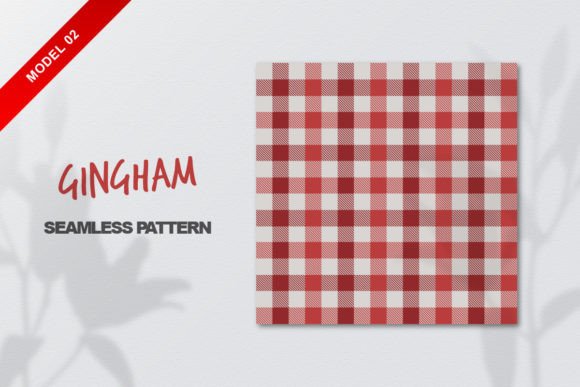
If you’ve ever spent hours trying to tile a gingham background only to spot misaligned seams or pixelated edges—this Red Gingham Seamless Pattern solves that instantly. It’s not just another repeatable design; it’s a precision-crafted, production-ready asset built for real-world use across digital and print workflows.
What Makes This Pattern Stand Out?
This isn’t a raster-only download with limited scalability. You receive two core files: one EPS CC vector file and one high-resolution JPG (4038 × 4038 px). That means whether you’re scaling up for a trade show banner or shrinking down for a social media icon, the pattern stays crisp—no blurring, no distortion, no guesswork.
The seamless tiling is engineered at the vector level, so every edge aligns perfectly when repeated in Illustrator, InDesign, Figma, or even CSS backgrounds. No manual nudging. No hidden gaps. Just clean, consistent repetition—every time.
And because it’s 100% vector-based, you can recolor the red instantly—swap it for burgundy, coral, or even black—without losing fidelity. The gingham grid itself maintains perfect proportion and spacing, preserving that classic checkered rhythm that reads as both nostalgic and fresh.
Where Designers & Teams Actually Use It
Professionals don’t just collect patterns—they deploy them. Here’s how this Red Gingham Seamless Pattern fits into actual workflows:
- Branding & Packaging: Small-batch food labels, boutique cosmetics boxes, or artisanal stationery—all benefit from the warmth and familiarity of red gingham. Its strong visual identity helps products stand out on crowded shelves while feeling approachable and handmade.
- Digital Interfaces: Used as subtle UI textures in dashboards, email headers, or presentation templates—especially in education or wellness spaces where friendly yet structured visuals reinforce trust and clarity.
- Print & Merchandise: From fabric mockups for textile designers to printable party invites or classroom posters, the 4038 px JPG gives photographers and educators a ready-to-drop-in background that prints cleanly on home inkjets or commercial presses.
- Social Content: Instagram story templates, Pinterest pins, or YouTube thumbnails gain texture and cohesion with this pattern—adding visual rhythm without overwhelming messaging.
Freelancers tell us they use it as a “design safety net”: when clients ask for “something cheerful but professional,” red gingham delivers tone and structure in one layer—freeing mental bandwidth for typography, hierarchy, and content.
Why Vector + High-Res JPG Is the Right Combo
Some creators assume vector alone is enough. Others default to JPEGs for speed. But real projects demand both—and this package respects that reality.
The EPS CC file lives inside your Adobe ecosystem: scale it infinitely, edit stroke weights, isolate squares for animation, or export SVG for web use. It’s editable—not just viewable.
The JPG (4038 × 4038 px) serves immediate needs: drag-and-drop into Canva, PowerPoint, or Google Slides; upload directly to Shopify product mockup tools; or use as a base layer in Procreate for hand-drawn overpainting. No conversion steps. No waiting for renders.
That dual-format approach saves time—especially when deadlines tighten or team members use different software. One designer works in Illustrator, another in Affinity Photo, a third in Figma—you all get what you need, without compromise.
Practical Considerations Before You Use It
Even great assets work best when matched thoughtfully to context. A few grounded notes:
- Color contrast matters: Red gingham carries strong chromatic weight. Pair it with neutral type (charcoal gray, off-white) or complementary accents (cream, navy, sage) rather than competing brights—unless intentional vibrancy is part of your brand voice.
- Scale affects perception: At small sizes (e.g., app icons), the check size may blur into texture. Test at intended output resolution. For fine-detail applications, consider zooming into the vector and adjusting square dimensions before exporting.
- Licensing clarity: This is a personal/commercial-use pattern—no attribution required, no per-project fees. But if you’re building a template for resale (e.g., a Canva template pack), confirm usage terms align with your distribution model.
Also worth noting: because it’s seamless *and* vector, you’re not locked into one orientation. Flip it horizontally or vertically, rotate 45° for dynamic diagonals, or overlay multiple instances at varying opacities to build depth—all without breaking the repeat logic.
When You Might Want Something Else (and What to Ask For)
This Red Gingham Seamless Pattern excels at consistency, versatility, and ease—but it’s not universal. If your project demands:
- Animated tiling (e.g., for web banners), request an SVG or Lottie version.
- CMYK-optimized EPS for strict print workflows, mention that upfront—many vector files default to RGB.
- Matching color variants (navy gingham, olive gingham), ask about bundle options—some creators offer coordinated palettes.
Mangata’s note—“Do you need my work in another format? Feel free to contact me via email on my Pinterest account profile”—is more than polite. It reflects responsiveness many buyers overlook until they’re mid-deadline. That kind of support makes reusable assets feel like long-term collaborators—not one-off downloads.
A Final Thought: Patterns Are Infrastructure
We rarely call them that—but good patterns function like infrastructure. They reduce decision fatigue, unify touchpoints, and accelerate execution. A well-built Red Gingham Seamless Pattern doesn’t just fill space; it reinforces mood, supports message, and quietly elevates professionalism—even when used simply.
Whether you’re designing a teacher’s lesson plan deck, prototyping a startup’s landing page, or prepping holiday packaging for your Etsy shop—this pattern earns its place in your toolkit by working reliably, looking intentional, and freeing you to focus on what matters most: the people on the other side of the screen or shelf.