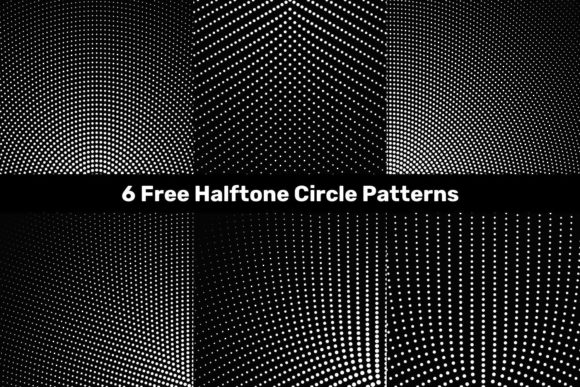
6 Free Halftone Circle Patterns
Halftone effects—especially those built from precise, evenly distributed circles—remain a quietly powerful tool in visual design. They add texture, depth, and retro-modern character without overwhelming composition. The 6 Free Halftone Circle Patterns package delivers exactly that: six distinct, scalable, production-ready halftone circle motifs, each available in high-resolution JPG (5000×5000 px), vector EPS, and native Adobe Illustrator (.AI) formats. Unlike many free pattern bundles that prioritize quantity over consistency, this set stands out for its uniform technical quality and thoughtful variation across tone, spacing, and dot density.
What Makes These Patterns Practical—and Not Just Pretty
At first glance, halftone patterns may seem like nostalgic decoration. But in practice, they serve functional roles: softening background layers, adding subtle hierarchy to typography overlays, reinforcing brand texture in print collateral, or creating tactile contrast in digital interfaces. The 6 Free Halftone Circle Patterns were clearly designed with real workflows in mind—not just as static images but as flexible assets. Each pattern is built on a clean, repeatable tile grid. No visible seams. No inconsistent scaling artifacts. That matters when applying them to large-format prints, responsive web backgrounds, or multi-page branding systems.
The six variations cover a useful spectrum: three lighter densities (subtle, airy, ideal for text overlays or light UI elements), two mid-range options (balanced contrast for posters, social banners, or packaging accents), and one dense, high-impact version suited for bold editorial treatments or textured foreground elements. This intentional progression means users aren’t forced to stretch or compress a single pattern to fit different contexts—they can choose the right tool for the job.
Quality and Consistency Across Formats
Vector fidelity is where many free halftone resources falter. Some .EPS files contain rasterized elements; others rely on overly complex paths that bloat file size or break in older software. The 6 Free Halftone Circle Patterns avoid both pitfalls. All vector files use simple, optimized circular paths—no gradients, no blends, no embedded bitmaps. They scale cleanly from business card size to billboard dimensions. Tested across Illustrator CC 2021–2024 and Affinity Designer 2, all six .AI and .EPS files opened without warning, preserved layer integrity, and retained editable stroke/fill properties.
The included JPGs are equally reliable: 5000×5000 px at 300 DPI, sRGB color space, flattened transparency (no alpha channel surprises). They’re suitable for immediate use in Canva, Figma, Photoshop, or PowerPoint—no conversion needed. For designers who need fast, dependable fallbacks while iterating, that’s valuable time saved.
Real-World Use Cases and Audience Fit
Freelancers building brand guidelines often need consistent, licensable texture elements that won’t trigger copyright flags. Educators designing classroom handouts benefit from clean, readable patterns that don’t compete with educational content. Small business owners updating social media templates appreciate ready-to-drop assets that reinforce visual identity without requiring design expertise. And marketers running A/B tests on email headers or landing page sections can quickly swap between halftone densities to gauge audience response to visual weight and rhythm.
For example, a local coffee roaster launching seasonal packaging might apply the medium-density halftone as a faint overlay behind product photography—adding warmth and craft authenticity without obscuring label legibility. A university communications team could use the lightest pattern as a subtle background for a faculty newsletter PDF, improving scannability while maintaining accessibility standards. Neither scenario demands custom illustration—just intelligent, accessible asset reuse.
Limitations to Keep in Mind
These are halftone circle patterns—not stipple, line, or noise-based alternatives. If your project calls for organic irregularity or tonal gradation, this set won’t fulfill that need. Similarly, there are no color variants: all patterns are grayscale, optimized for CMYK and RGB output. Users needing spot-color versions (e.g., Pantone 286 for a blue-branded campaign) would need to recolor manually—a straightforward task in Illustrator, but still an extra step.
Also worth noting: while the patterns tile seamlessly, they do not include alternate alignment guides or bleed extensions. Designers preparing print-ready files for physical products (e.g., fabric, stationery, or signage) should verify tiling behavior at final output size and adjust margins accordingly. There’s no documentation file included, though the naming convention (halftone_circle_light_01.ai, etc.) is clear and logical.
Workflow Integration and Long-Term Utility
Unlike disposable “freebie” graphics that gather dust after one project, the 6 Free Halftone Circle Patterns integrate smoothly into ongoing creative practice. Their vector-native structure supports non-destructive editing: change dot size via global stroke width, adjust spacing by transforming the entire tile, or convert to outlines for further manipulation. Because they’re built on standard grids, they also align predictably with layout frameworks—useful when matching halftones to typography baselines or modular grid systems.
From a long-term perspective, these patterns hold up well across evolving tools. They don’t rely on proprietary effects or cloud-dependent plugins. Even if software updates shift rendering behavior, the underlying geometry remains intact. That reliability translates to reduced rework—whether revisiting a 2022 brochure design in 2025 or adapting a social template for a new platform with different aspect ratios.
Who Should Download—And Who Might Look Elsewhere
This package serves best those who value precision, efficiency, and quiet versatility. If you regularly work with branding systems, marketing collateral, editorial layouts, or presentation decks—and prefer assets that behave predictably rather than requiring constant troubleshooting—the 6 Free Halftone Circle Patterns are a pragmatic addition to your toolkit.
It’s less ideal for users seeking maximal stylistic variety (e.g., mixed halftone + grain + noise combinations), animated variants, or patterns pre-integrated into Figma or Sketch libraries. Likewise, teams needing enterprise-wide licensing assurance should verify usage rights directly with the source, as terms vary by distributor—even for free assets.
In short, the 6 Free Halftone Circle Patterns deliver what they promise: six technically sound, visually cohesive, format-flexible halftone circle motifs. They won’t replace custom illustration—but they’ll save hours of manual dot placement, prevent last-minute rasterization errors, and support stronger, more consistent visual communication across mediums. For professionals who treat design assets as infrastructure—not decoration—that’s a meaningful distinction.